3.1. Basics: GridRad Severe
This demo/tutorial illustrates the basics of THUNER by tracking and visualizing mesoscale convective system (MCS) objects in GridRad Severe data. See Short et al. (2023) for methodological details. By the end of the notebook, you should be able to generate the animation below.
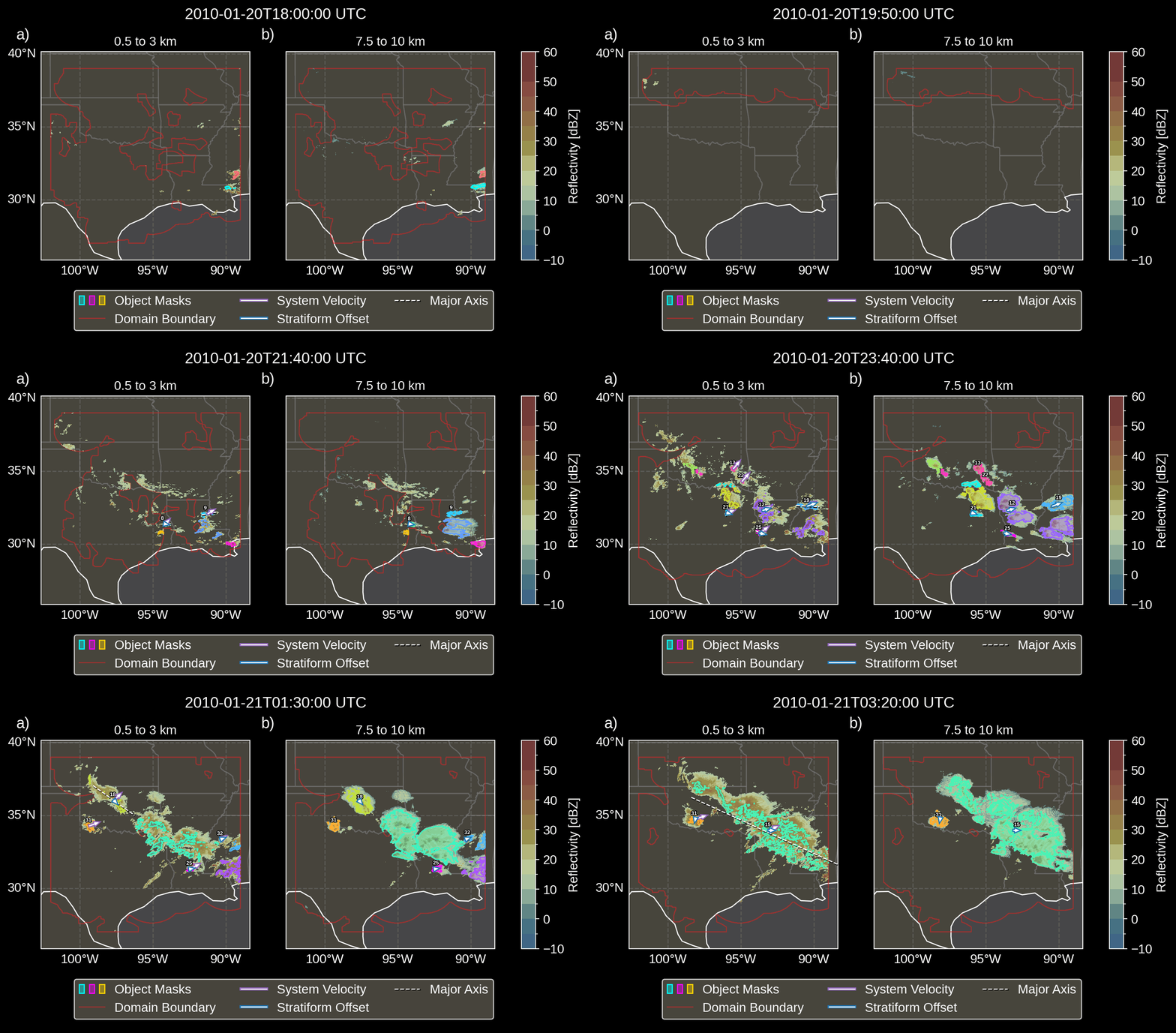
Fig. 3.1 Animation depicting tracked MCSs.
3.1.1. Setup
First, import the requisite modules.
 1"""GridRad Severe demo/test."""
 2
 3%load_ext autoreload
 4%autoreload 2
 5
 6import shutil
 7import yaml
 8import numpy as np
 9import xarray as xr
10import thuner.data as data
11import thuner.option as option
12import thuner.analyze as analyze
13import thuner.parallel as parallel
14import thuner.visualize as visualize
15import thuner.attribute as attribute
16import thuner.default as default
17import thuner.config as config
18import thuner.utils as utils
Welcome to the Thunderstorm Event Reconnaissance (THUNER) package
v0.0.16! This package is still in testing and development. Please visit
github.com/THUNER-project/THUNER for examples, and to report issues or contribute.

THUNER is a flexible toolkit for performing multi-feature detection,
tracking, tagging and analysis of events within meteorological datasets.
The intended application is to convective weather events. For examples
and instructions, see https://github.com/THUNER-project/THUNER and
https://thuner.readthedocs.io/en/latest/. If you use THUNER in your research, consider
citing the following papers;

Short et al. (2023), doi: 10.1175/MWR-D-22-0146.1
Raut et al. (2021), doi: 10.1175/JAMC-D-20-0119.1
Fridlind et al. (2019), doi: 10.5194/amt-12-2979-2019
...
Next, specify the folders where THUNER outputs will be saved. Note that
THUNER stores a fallback output directory in a config file, accessible
via the functions thuner.config.set_outputs_directory() and
thuner.config.get_outputs_directory(). By default, this fallback
directory is Path.home() / THUNER_output.
 1# Set a flag for whether or not to remove existing output directories
 2remove_existing_outputs = False
 3
 4# Parent directory for saving outputs
 5base_local = config.get_outputs_directory()
 6output_parent = base_local / f"runs/gridrad/gridrad_demo"
 7options_directory = output_parent / "options"
 8visualize_directory = output_parent / "visualize"
 9
10# Delete the output directory for the run if it already exists
11if output_parent.exists() & remove_existing_outputs:
12    shutil.rmtree(output_parent)
Next download the demo data for the tutorial, if you haven’t already.
1# Download the demo data
2remote_directory = "s3://thuner-storage/THUNER_output/input_data/raw/d81006"
3data.get_demo_data(base_local, remote_directory)
4remote_directory = "s3://thuner-storage/THUNER_output/input_data/raw/"
5remote_directory += "era5_monthly_39N_102W_27N_89W"
6data.get_demo_data(base_local, remote_directory)
2025-07-09 17:02:45,218 - thuner.data._utils - INFO - Syncing directory /home/ewan/THUNER_output/input_data/raw/d81006. Please wait.
2025-07-09 17:02:46,368 - thuner.data._utils - INFO - Syncing directory /home/ewan/THUNER_output/input_data/raw/era5_monthly_39N_102W_27N_89W. Please wait.
3.1.2. Options
We now specify the options for the THUNER run. Options classes in THUNER
are built on the pydantic.BaseModel, which provides a simple way to
describe and validate options. Options objects are initialized using
keyword, value pairs. Below we specify the options for a GridRad Severe
dataset.
1# Uncomment the line below to download the demo data if not already present
2# data.get_demo_data()
3event_directories = data.gridrad.get_event_directories(year=2010, base_local=base_local)
4event_directory = event_directories[0] # Take the first event from 2010 for the demo
5# Get the start and end times of the event, and the date of the event start
6start, end, event_start = data.gridrad.get_event_times(event_directory)
7times_dict = {"start": start, "end": end}
8gridrad_dict = {"event_start": event_start}
9gridrad_options = data.gridrad.GridRadSevereOptions(**times_dict, **gridrad_dict)
2025-07-09 17:02:48,733 - thuner.data.gridrad - INFO - Generating GridRad filepaths.
Options instances can be examined using the model_dump method, which
converts the instance to a dictionary.
1gridrad_options.model_dump()
{'type': 'GridRadSevereOptions',
 'name': 'gridrad',
 'start': '2010-01-20T18:00:00',
 'end': '2010-01-21T03:30:00',
 'fields': ['reflectivity'],
 'parent_remote': 'https://data.rda.ucar.edu',
 'parent_local': '/home/ewan/THUNER_output/input_data/raw',
 'converted_options': {'type': 'ConvertedOptions',
  'save': False,
  'load': False,
  'parent_converted': '/home/ewan/THUNER_output/input_data/converted'},
 'filepaths': ['/home/ewan/THUNER_output/input_data/raw/d841006/volumes/2010/20100120/nexrad_3d_v4_2_20100120T180000Z.nc',
  '/home/ewan/THUNER_output/input_data/raw/d841006/volumes/2010/20100120/nexrad_3d_v4_2_20100120T181000Z.nc',
  '/home/ewan/THUNER_output/input_data/raw/d841006/volumes/2010/20100120/nexrad_3d_v4_2_20100120T182000Z.nc',
  '/home/ewan/THUNER_output/input_data/raw/d841006/volumes/2010/20100120/nexrad_3d_v4_2_20100120T183000Z.nc',
...
The model_summary() method of an options instance returns a string
summary of the fields in the model. Note the parent_local field,
which provides the parent directory on local disk containing the
dataset. Analogously, parent_remote specifies the remote location of
the data; which is useful when one wants to access data from a remote
location during the tracking run. Note also the filepaths field,
which provides a list of the dataset’s absolute filepaths. The idea is
that for standard datasets, filepaths can be populated automatically
by looking in the parent_local directory, assuming the same
sub-directory structure as in the dataset’s original location. If the
dataset is nonstandard, the filepaths list can be explicitly
provided by the user. For datasets that do not yet have convenience
classes in THUNER, the thuner.utils.BaseDatasetOptions class can be
used. Note also the use field, which tells THUNER whether the
dataset will be used to track or tag objects. Tracking in THUNER
means detecting objects in a dataset, and matching those objects across
time. Tagging means attaching attributes from potentially different
datasets to detected objects.
1print(gridrad_options.model_summary())
Field Name: Type, Description
-------------------------------------
type: typing.Literal['GridRadSevereOptions'], None
name: <class 'str'>, Name of the dataset.
start: str | numpy.datetime64, Tracking start time.
end: str | numpy.datetime64, Tracking end time.
fields: list[str] | None, List of dataset fields, i.e. variables, to use. Fields should be given using their thuner, i.e. CF-Conventions, names, e.g. 'reflectivity'.
parent_remote: str | None, Parent directory of the dataset on remote storage.
parent_local: str | pathlib.Path | None, Parent directory of the dataset on local storage.
converted_options: <class 'thuner.utils.ConvertedOptions'>, Options for saving and loading converted data.
filepaths: list[str] | dict, List of filepaths for the dataset.
attempt_download: <class 'bool'>, Whether to attempt to download the data.
deque_length: <class 'int'>, Number of current/previous grids from this dataset to keep in memory. Most tracking algorithms require a 'next' grid, 'current' grid, and at least two previous grids.
use: typing.Literal['track', 'tag', 'both'], Whether this dataset will be used for tagging, tracking or both.
start_buffer: <class 'int'>, Minutes before interval start time to include. Useful for tagging when one wants to record pre-storm ambient profiles.
...
We will also create dataset options for ERA5 single-level and pressure-level data, which we use for tagging the storms detected in the GridRad Severe dataset with other attributes, e.g. ambient winds and temperature.
1era5_dict = {"latitude_range": [27, 39], "longitude_range": [-102, -89]}
2era5_pl_options = data.era5.ERA5Options(**times_dict, **era5_dict)
3era5_dict.update({"data_format": "single-levels"})
4era5_sl_options = data.era5.ERA5Options(**times_dict, **era5_dict)
2025-07-09 17:02:53,390 - thuner.data.era5 - INFO - Generating era5 filepaths.
2025-07-09 17:02:53,392 - thuner.data.era5 - INFO - Generating era5 filepaths.
All the dataset options are grouped into a single
thuner.option.data.DataOptions object, which is passed to the THUNER
tracking function. We also save these options as a YAML file.
1datasets = [gridrad_options, era5_pl_options, era5_sl_options]
2data_options = option.data.DataOptions(datasets=datasets)
3data_options.to_yaml(options_directory / "data.yml")
Now create and save options describing the grid. If regrid is
False and grid properties like altitude_spacing or
geographic_spacing are set to None, THUNER will attempt to infer
these from the tracking dataset.
1# Create and save the grid_options dictionary
2kwargs = {"name": "geographic", "regrid": False, "altitude_spacing": None}
3kwargs.update({"geographic_spacing": None})
4grid_options = option.grid.GridOptions(**kwargs)
5grid_options.to_yaml(options_directory / "grid.yml")
2025-07-09 17:02:55,334 - thuner.option.grid - WARNING - altitude_spacing not specified. Will attempt to infer from input.
2025-07-09 17:02:55,335 - thuner.option.grid - WARNING - shape not specified. Will attempt to infer from input.
Finally, we create options describing how the tracking should be
performed. In multi-feature tracking, some objects, like mesoscale
convective systems (MCSs), can be defined in terms of others, like
convective and stratiform echoes. THUNER’s approach is to first specify
object options seperately for each object type, e.g. convective echoes,
stratiform echoes, mesoscale convective systems, and so forth. Object
options are specified using pydantic models which inherit from
thuner.option.track.BaseObjectOptions. Related objects are then
grouped together into thuner.option.track.LevelOptions models. The
final thuner.option.track.TrackOptions model, which is passed to the
tracking function, then contains a list of
thuner.option.track.LevelOptions models. The idea is that “lower
level” objects, can comprise the building blocks of “higher level”
objects, with THUNER processing the former before the latter.
In this tutorial, level 0 objects are the convective, middle and
stratiform echo regions, and level 1 objects are mesoscale convective
systems defined by grouping the level 0 objects. Because
thuner.option.track.TrackOptions models can be complex to construct,
a function for creating a default thuner.option.track.TrackOptions
model matching the approach of Short et
al. (2023) is defined in
the module thuner.default.
1# Create the track_options dictionary
2track_options = default.track(dataset_name="gridrad")
3# Show the options for the level 0 objects
4print(f"Level 0 objects list: {track_options.levels[0].object_names}")
5# Show the options for the level 1 objects
6print(f"Level 1 objects list: {track_options.levels[1].object_names}")
Level 0 objects list: ['convective', 'middle', 'anvil']
Level 1 objects list: ['mcs']
Note a core component of the options for each object is the
atributes field, which describes how object attributes like
position, velocity and area, are to be retrieved and stored. In THUNER,
the code for collecting object attributes is seperated out from the core
tracking code, allowing different attributes for different objects to be
swapped in and out as needed. Individual attributes are described by the
thuner.option.attribute.Attribute model, where each
thuner.option.attribute.Attribute will form a column of an output
CSV file.
Sometimes multiple thuner.option.attribute.Attribute are grouped
into a thuner.option.attribute.AttributeGroup model, in which all
attributes in the group are retrieved at once using the same method. For
instance, attributes based on ellipse fitting, like major and minor
axis, eccentricity and orientation, form a
thuner.option.attribute.AttributeGroup. Note however that each
member of the group will still form a seperate column in the output CSV
file.
Finally, collections of attributes and attribute groups are organized
into thuner.option.attribute.AttributeType models. Each attribute
type corresponds to related attributes that will be stored in a single
CSV file. This makes the number of columns in each file much smaller,
and THUNER outputs easier to manage and inspect directly. To illustrate,
below we print the MCS object’s “core” attribute type options.
1# Show the options for mcs coordinate attributes
2mcs_attributes = track_options.object_by_name("mcs").attributes
3core_mcs_attributes = mcs_attributes.attribute_type_by_name("core")
4core_mcs_attributes.model_dump()
{'type': 'AttributeType',
 'name': 'core',
 'description': 'Core attributes of tracked object, e.g. position and velocities.',
 'attributes': [{'type': 'Attribute',
   'name': 'time',
   'retrieval': {'type': 'Retrieval',
    'function': <function thuner.attribute.core.time_from_tracks(attribute: thuner.option.attribute.Attribute, object_tracks)>,
    'keyword_arguments': {}},
   'data_type': numpy.datetime64,
   'precision': None,
   'description': 'Time taken from the tracking process.',
   'units': 'yyyy-mm-dd hh:mm:ss'},
  {'type': 'Attribute',
   'name': 'universal_id',
   'retrieval': {'type': 'Retrieval',
...
The default thuner.option.track.TrackOptions use “local” and
“global” cross-correlations to measure object velocities, as described
by Raut et al. (2021) and
Short et al. (2023). For
GridRad severe, we modify this approach slightly so that “global”
cross-correlations are calculated using boxes encompassing each object,
with a margin of 70 km around the object. Note that pydantic models are
automatically validated when first created. Because we are changing the
model instance, we should revalidate the object options model to check
we haven’t broken anything.
1track_options.levels[1].objects[0].tracking.unique_global_flow = False
2track_options.levels[1].objects[0].tracking.global_flow_margin = 70
3track_options.levels[1].objects[0].revalidate()
4track_options.to_yaml(options_directory / "track.yml")
Users can also specify visualization options for generating figures during a tracking run. Uncomment the line below to generate figures that visualize the matching algorithm - naturally this makes a tracking run much slower.
1visualize_options = None
2# visualize_options = default.runtime(visualize_directory=visualize_directory)
3# visualize_options.to_yaml(options_directory / "visualize.yml")
3.1.3. Tracking
To perform the tracking run, we need an iterable of the times at which
objects will be detected and tracked. The convenience function
thuner.utils.generate_times() creates a generator from the dataset
options for the tracking dataset. We can then pass this generator, and
the various options, to the tracking function thuner.parallel.track().
During the tracking run, outputs will be created in the
output_parent directory, within the subfolders interval_0,
interval_1 etc, which represent subintervals of the time period
being tracked. At the end of the run, these outputs are stiched
together.
1times = utils.generate_times(data_options.dataset_by_name("gridrad").filepaths)
2args = [times, data_options, grid_options, track_options, visualize_options]
3num_processes = 4 # If visualize_options is not None, num_processes must be 1
4kwargs = {"output_directory": output_parent, "num_processes": num_processes}
5# In parallel tracking runs, we need to tell the tracking function which dataset to use
6# for tracking, so the subinterval data_options can be generated correctly
7kwargs.update({"dataset_name": "gridrad"})
8parallel.track(*args, **kwargs)
2025-07-09 17:03:08,621 - thuner.parallel - INFO - Beginning parallel tracking with 4 processes.
2025-07-09 17:03:15,233 - thuner.track.track - INFO - Beginning thuner tracking. Saving output to /home/ewan/THUNER_output/runs/gridrad/gridrad_demo/interval_0.
2025-07-09 17:03:15,538 - thuner.track.track - INFO - Beginning thuner tracking. Saving output to /home/ewan/THUNER_output/runs/gridrad/gridrad_demo/interval_1.
2025-07-09 17:03:15,623 - thuner.track.track - INFO - Beginning thuner tracking. Saving output to /home/ewan/THUNER_output/runs/gridrad/gridrad_demo/interval_2.
2025-07-09 17:03:15,732 - thuner.track.track - INFO - Beginning thuner tracking. Saving output to /home/ewan/THUNER_output/runs/gridrad/gridrad_demo/interval_3.
2025-07-09 17:03:16,005 - thuner.track.track - INFO - Processing 2010-01-20T18:00:00.
2025-07-09 17:03:16,006 - thuner.utils - INFO - Updating gridrad input record for 2010-01-20T18:00:00.
2025-07-09 17:03:16,198 - thuner.track.track - INFO - Processing 2010-01-20T20:20:00.
2025-07-09 17:03:16,199 - thuner.utils - INFO - Updating gridrad input record for 2010-01-20T20:20:00.
2025-07-09 17:03:16,460 - thuner.track.track - INFO - Processing 2010-01-20T22:40:00.
2025-07-09 17:03:16,462 - thuner.utils - INFO - Updating gridrad input record for 2010-01-20T22:40:00.
2025-07-09 17:03:16,817 - thuner.track.track - INFO - Processing 2010-01-21T01:00:00.
2025-07-09 17:03:16,819 - thuner.utils - INFO - Updating gridrad input record for 2010-01-21T01:00:00.
2025-07-09 17:03:22,065 - thuner.utils - INFO - Grid options not set. Inferring from dataset.
2025-07-09 17:03:22,069 - thuner.utils - WARNING - Altitude spacing not uniform.
...
The outputs of the tracking run are saved in the output_parent
directory. The options for the run are saved in human-readable YAML
files within the options directory. For reproducibility, Python
objects can be rebuilt from these YAML files by reading the YAML, and
passing this to the appropriate pydantic model.
1with open(options_directory / "data.yml", "r") as f:
2    data_options = option.data.DataOptions(**yaml.safe_load(f))
3    # Note yaml.safe_load(f) is a dictionary.
4    # Prepending with ** unpacks the dictionary into keyword/argument pairs.
5data_options.model_dump()
The convenience function thuner.analyze.utils.read_options reloads
all options in the above way, storing the different options in a
dictionary.
1all_options = analyze.utils.read_options(output_parent)
2all_options["data"].model_dump()
Object attributes, e.g. MCS position, area and velocity, are saved as
CSV files in nested subfolders. Attribute metadata is recorded in YAML
files. One can then load attribute data using pandas.read_csv. One
can also create an appropriately formatted pandas.DataFrame using
the convenience function thuner.attribute.utils.read_attribute_csv().
1core = attribute.utils.read_attribute_csv(output_parent / "attributes/mcs/core.csv")
2print(core.head(20).to_string())
Records of the filepaths corresponding to each time of the tracking run
are saved in the records folder. These records are useful for
generating figures after a tracking run.
1filepath = output_parent / "records/filepaths/gridrad.csv"
2records = attribute.utils.read_attribute_csv(filepath)
3print(records.head(20).to_string())
Object masks are saved as ZARR files, which can be read using
xarray.
1xr.open_dataset(output_parent / "masks/mcs.zarr").info()
3.1.4. Analysis and Visualization
We can then perform analysis on the tracking run outputs. Below we perform the MCS classifications discussed by Short et al. (2023).
1analysis_options = analyze.mcs.AnalysisOptions()
2analyze.mcs.process_velocities(output_parent, profile_dataset="era5_pl")
3analyze.mcs.quality_control(output_parent, analysis_options)
4analyze.mcs.classify_all(output_parent, analysis_options)
5filepath = output_parent / "analysis/classification.csv"
6classifications = attribute.utils.read_attribute_csv(filepath)
7print("\n" + classifications.head(20).to_string())
We can also generate figures and animations from the output. Below we
visualize the convective and stratiform regions of each MCS, displaying
each system’s velocity and stratiform-offset, and the boundaries of the
radar mosaic domain, as discussed by Short et
al. (2023). By default,
figures and animations are saved in the output_parent directory in
the visualize folder. The code below should generate an animation
mcs_gridrad_20100120.gif, matching the animation provided at the
start of the notebook.
1name = f"mcs_gridrad_{event_start.replace('-', '')}"
2style = "presentation"
3attribute_handlers = default.grouped_attribute_handlers(output_parent, style)
4kwargs = {"name": name, "object_name": "mcs", "style": style}
5kwargs.update({"attribute_handlers": attribute_handlers, "dt": 7200})
6figure_options = option.visualize.GroupedHorizontalAttributeOptions(**kwargs)
7args = [output_parent, start, end, figure_options, "gridrad"]
8args_dict = {"parallel_figure": True, "by_date": False, "num_processes": 4}
9visualize.attribute.series(*args, **args_dict)
3.1.5. Relabelling
Sometimes we need to define new objects based on the split-merge history of the objects tracked during a THUNER run.